Over the past few weeks I’ve written a lot about the city, about processions, coffee machines, and wrong buses. But about the work itself I’ve said almost nothing. Time to change that.
The Company
I’m working for Xelab, a young tech company based in Zaragoza. Their portfolio is broad: web development, automation, artificial intelligence, and various other IT topics. No narrow niche product, instead, a company that deliberately keeps its options open.
My project sits at the intersection of AI and health, a space that’s seeing a lot of movement right now.
Getting Started
On my first day, I had a conversation with the CTO. Not a formal interview, more of a mutual getting-to-know-you. He talked about himself, about the company, and about the tech scene in Spain and Zaragoza in general. A calm, easy start.
In the days that followed, I worked my way through a topic of my own, with a few guidelines but plenty of room to explore. After some back and forth, a focus emerged: health combined with local AI.
Research First, Build Later
What followed wasn’t programming. At least not yet.
First came research. I looked at apps, websites, hardware gadgets, and software solutions dealing with physical wellbeing. What do they do well? Where are the gaps? What do they promise, and do they actually deliver?
I tested some products myself. For cost reasons that wasn’t possible across the board, but where it was, it was genuinely fun. A bit like being a small detective: identifying factors, recording observations, piecing together a picture.
Once I’d presented my findings, things moved into practice.
The Project: Making Posture Visible
Based on my research and with an eye toward my technical strengths, a concrete task took shape: develop an Android app that analyses a person’s posture in real time and gives visual feedback on whether their spinal position is healthy or not.
Since my most experience is with Kotlin Native for Android, it was a natural fit.
The app is internally called Zaragoza Posture Tracker and is built around two core Google technologies:
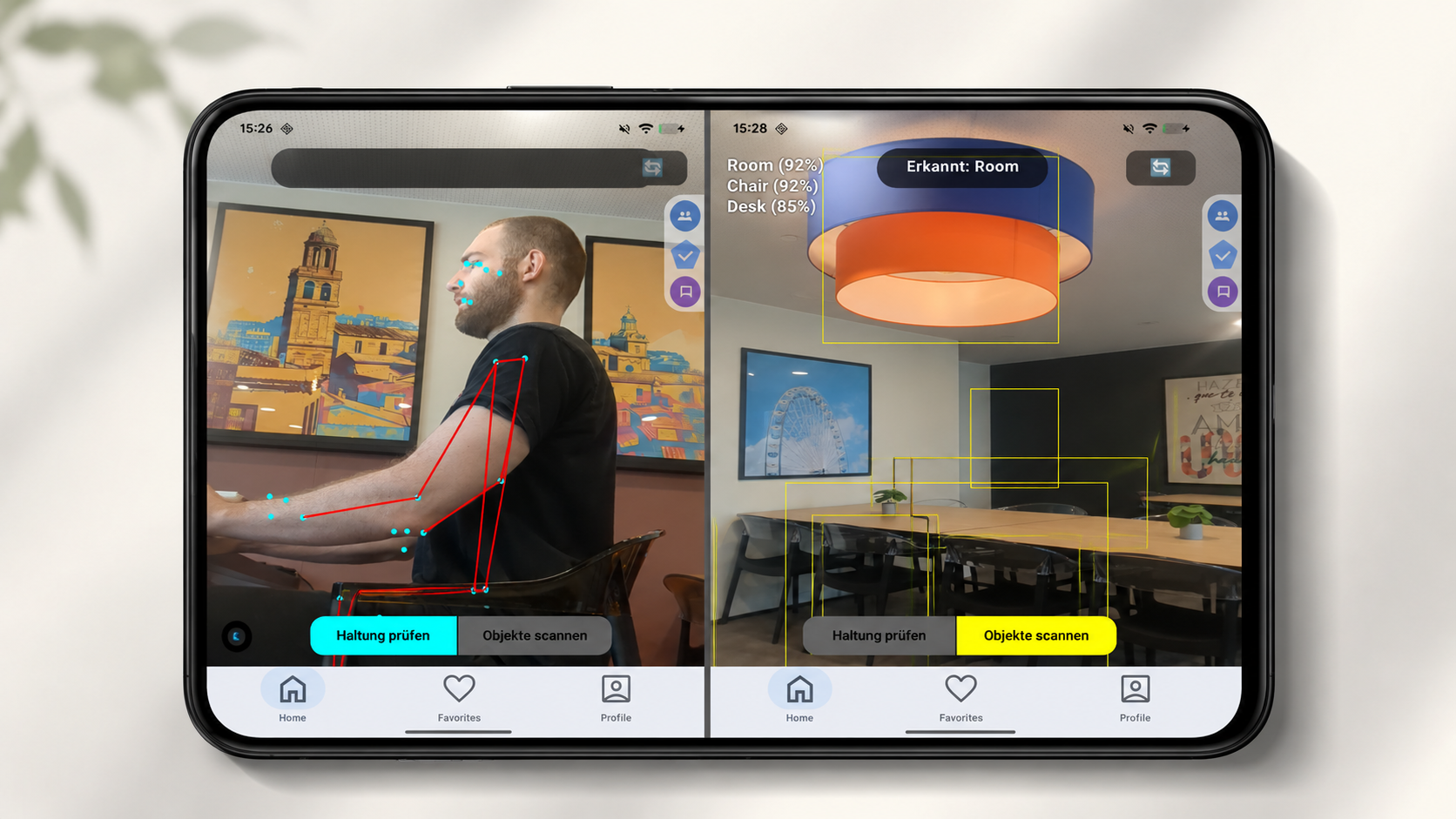
- ML Kit Pose Detection identifies body landmarks, shoulders, hips, spine, and analyses posture from them in real time.
- CameraX handles the camera integration: a stable live feed, fed directly into the analysis pipeline.
The result is colour-coded. Green means posture is fine. Other colours indicate something needs adjusting. No text, no lengthy explanations, just a direct, visual signal.
The Additional Feature
Alongside the posture analysis, there’s a second function: a toggle switches the app into an object recognition mode. Instead of body landmarks, the camera then analyses the environment, detecting objects and labelling scenes. The idea is to establish context: is the person sitting at a desk? Standing? What’s in their field of view?
Two more ML Kit modules handle this: Object Detection and Image Labeling. Both run on the same camera stream, a shared analyser processes pose and objects simultaneously, with no need for a separate feed.
The entire UI is built in Jetpack Compose, Android’s modern UI framework.
Where Things Stand
The app is currently at the stage of a working prototype. Camera preview, pose tracking, object detection, and permission handling are all up and running. What’s still missing is the fine-tuning: more precise posture classification, better visual feedback, and the connection between environment recognition and posture recommendations.
What comes next is already clear: the software is meant to run not on a smartphone but on a microcomputer, small, compact, with an integrated camera element. A different form factor, different possibilities.
Until then, it’s a matter of refining the app and waiting. The hardware is still on its way.
What I’m Taking Away
Research often sounds unspectacular, but that first block gave me more than I expected. You only really understand a topic once you’ve worked through dozens of solutions all tackling the same problem and arriving at completely different answers.
And then building the app, turning something that previously existed only in spreadsheets and notes into something real, that has its own kind of satisfaction. When the camera recognises a body for the first time and correctly places the landmarks, that’s a moment you can’t buy.
I’m curious to see where this leads.